
The Simple (and Free) Money Management Spreadsheet You Need Now
Let me show you the spreadsheet system I’ve used to manage our checking accounts and monthly bills for nearly 20 years.
There are endless philosophies about money out there—but few come with simple, lasting tools to actually do the work.
This one does.
It’s more than a generic Microsoft template or “cute” printable budget—it’s a practice.
This simple spreadsheet isn’t the star, but it helps you accomplish the part that is. The key to money management isn’t the special app or template; it’s the practice of proactively and intentionally managing your money to build the life you actually want.
What’s in the Spreadsheet
This money management system centers on two main spreadsheets:
Running account logs for each bank account (like an old-school checkbook register).
A debt tracker, which we’ll cover another time.
In this post, we’ll focus on the checking account tracker—the backbone of the system. The logistics are slightly different in your savings account, but this tracking and projecting process works exactly the same way.
You can open a Google Sheets copy of my free family finances spreadsheet template here to get started quickly. Simply use it online in Sheets or download it from Sheets as an Excel file to save on your computer.
Get your money management spreadsheet template here (use in Google Sheets or download to Excel)
Why Use a Spreadsheet (Not an App)
There are plenty of available money apps, but few people stick with them for years—and you don’t control their costs, data privacy, or even whether they still exist a few years down the road (as we’ve seen with Mint Money and Qube shutting down or having major service disruptions).
My spreadsheet, on the other hand, has tracked every dollar since I was 23 years old. It’s free, customizable, backed up in Dropbox (or whatever cloud storage you like to use), and yours for life. No subscriptions, no feature changes—just maximum simplicity and control.
Two Key Purposes of the Tracker
The checking account tracker does two main jobs:
Tracks money in and out so you always know your true available balance.
Forecasts future months, letting you plan ahead instead of reacting.
Imagine paying bills once a month—confident the money’s ready. No waiting for paychecks, no juggling due dates. This system gets you there.
A New Way to Know Your Balance
Your spreadsheet becomes the authority on your balance—not the ATM receipt.
If your ATM says $6,000, but your spreadsheet (which accounts for all upcoming bills throughout a month) says $250, believe the spreadsheet. That number already accounts for what’s spoken for.
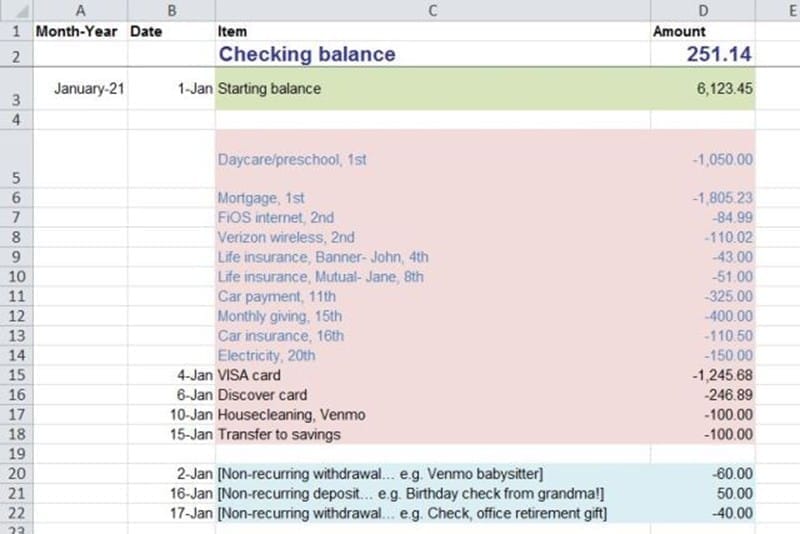
Tracking: Touch Every Dollar
Even if your expenses are predictable, tracking matters. Observation changes behavior.
And this system helps you “touch” every virtual dollar. When a bill increases or an automatic payment stops, you’ll notice immediately by doing this. For example (though there are many), that’s how I caught a $40 cable increase—and promptly cut the cord. It’s also how I spotted an accidental overcharge in childcare fees that would’ve cost us hundreds over time.
You don’t need to obsess over every cent. But you do need to notice changes and patterns—and this method makes that easy and obvious.
Forecasting: See Your Future Bank Account
Forecasting is where this gets fun—and powerful.
In a spreadsheet like this, you can quickly simulate the months ahead by copying your recurring transactions forward. Add expected one-offs (like water bills or holiday spending), adjust as needed, and see your future balance play out.
If it looks tight, you’ll know early—before you overspend. Tighten up, pause discretionary spending, or shift savings.
If it looks strong, plan how to use that margin—add to savings, invest, or fund something meaningful.
This is how you move from reacting to intentionally and proactively managing your money.
Setting Up Your Spreadsheet
There are four main categories of transactions:
1. Income (green cells in example)

2. Autopay bills (pink cells, with blue text)
3. Manually paid bills (pink, black text)
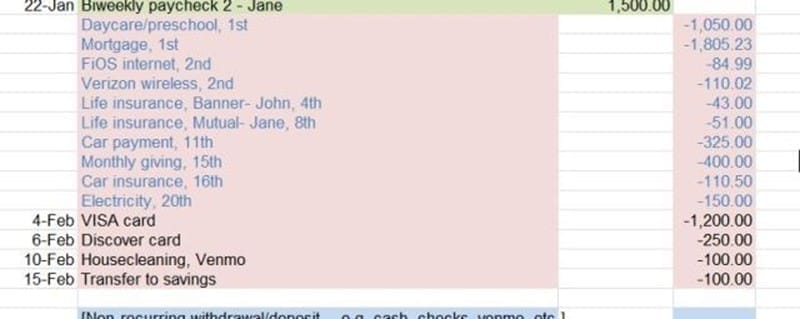
4. Non-monthly or incidental items (blue cells)

List your regular bills with due dates and expected amounts. If you follow my example, you’ll use blue text for autodebit items, to differentiate from items you need to manually pay each month (black text). Copy that block of transactions a few times to build out the next few months.
If you manage multiple checking accounts, make a separate tab for each.
When You Open the Template
When you open the template, you’ll see one sample month filled in with example data. Start by replacing those sample entries with your real bills and income. The green cells are for income, pink for the usual recurring bills, and blue for irregular items. This way, you can copy and paste the entire recurring month down to create future months.
Your Monthly Money Session
Once you’re set up, your monthly session takes about 30 minutes.
1. Reconcile the past month.
First, match your spreadsheet with your bank account. Add any missed transactions, confirm paychecks, and double-check amounts for bills that vary slightly. After doing this “balance the checkbook” review, ensure the balances align up to the current date. Then you’re ready to set up and pay bills for the whole month ahead.
2. Set up and pay the new month’s bills.
Move each autopay item for the upcoming month into the “completed” column so that your balance accounts for them. Schedule any manually-paid payments, enter amounts and dates, then mark them as paid by moving them to the “completed” column also.
You can even schedule payments for their due dates—keeping the money in your account until then but ensuring your available balance is updated to reflect that money going out.
Based on the available balance after your monthly income and bills are accounted for, you can strategize decisions to deal with any problems ahead of time.
That’s it. No category math. No stress. Just one simple system that keeps everything current and clear.
Don’t worry if you’re not sure you’re “doing it right” yet. The this is a practice—you’ll be amazed how quickly it clicks once you start entering real numbers and working with your spreadsheet in real life.
Notes
Spending Transactions
If you use a debit card for all purchases, you’ll have more entries. This can become overwhelming. Consider switching to cash or credit for easier tracking and to keep your spending money bucket completely separate from your cleaner cyclical monthly income and bills. Another option is to open a separate debit account where you allocate spending money separately.
Paying Bills with Last Month’s Money
Eventually, aim to pay each month’s bills using the previous month’s income. That buffer is what turns chaos into calm, and peace of mind into your new normal.
If you’re not there yet, that’s okay. Work toward building up extra until you’re eventually one month ahead.
And, most importantly, even if you fall off track, keep coming back.
Progress is built on persistence of small, consistent steps.
Join the newsletter
Thanks for reading! You can get more financial wisdom each Thursday in my popular Under 2 email newsletter – short insights to empower your money life – that you can read in 2 minutes or less.
Enter your email now and join 8,000+ other subscribers: